Deploying a Next.js Site to Cloudflare Workers with GitHub Integration
This guide contains the steps to deploy a Nextjs Project to Cloudflare Workers using a Github connection , by using @opennextjs/cloudflare adapter for compatiblity with the Cloudflare Workers runtime.
Some Requirements to keep in mind
- A Cloudflare account. Sign up at cloudflare.com.
- A Github repo wich contains the Nextjs Project .
- Node js (or any package manager to install npm packages) installed locally (I am using bun) .
- A Next.js project configured to use the Node.js runtime (not Edge runtime) for Cloudflare Workers compatibility.
Step-by-Step Instructions
- Install the OpenNext adapter:
SHELL
bun add @opennextjs/cloudflare@latest- Install Wrangler CLI:
SHELL
bun add -D wrangler@latest- Creat a new file in the root of your project named
open-next.config.ts:
TS
import { defineCloudflareConfig } from "@opennextjs/cloudflare";

export default defineCloudflareConfig();- Create a another file in the root of your project named
wrangler.jsonc:
JSON
{
  "main": ".open-next/worker.js",
// Change your app name here
  "name": "my-app",
  "compatibility_date": "2025-03-25",
// compatibility_date may change check latest documentation
  "compatibility_flags": [
    "nodejs_compat"
  ],
  "assets": {
    "directory": ".open-next/assets",
    "binding": "ASSETS"
  }
}- In your
package.jsonyou can add these lines in the script section for local preview (optional):
JSON
"preview": "opennextjs-cloudflare build && opennextjs-cloudflare preview",- If you have added the
previewtopackage.jsonthen you can locally build and preview to see everything is right or not (optional):
SHELL
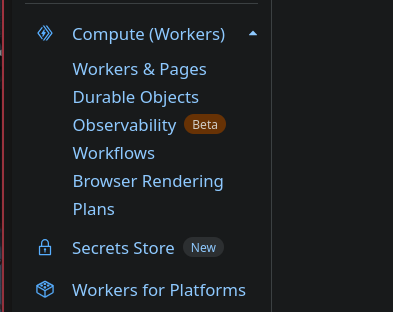
bun run preview- Head to Cloudfare Dashborard from the sidebar in expand the menu named
Compute(Workers)and Click onWorkers & Pages: